


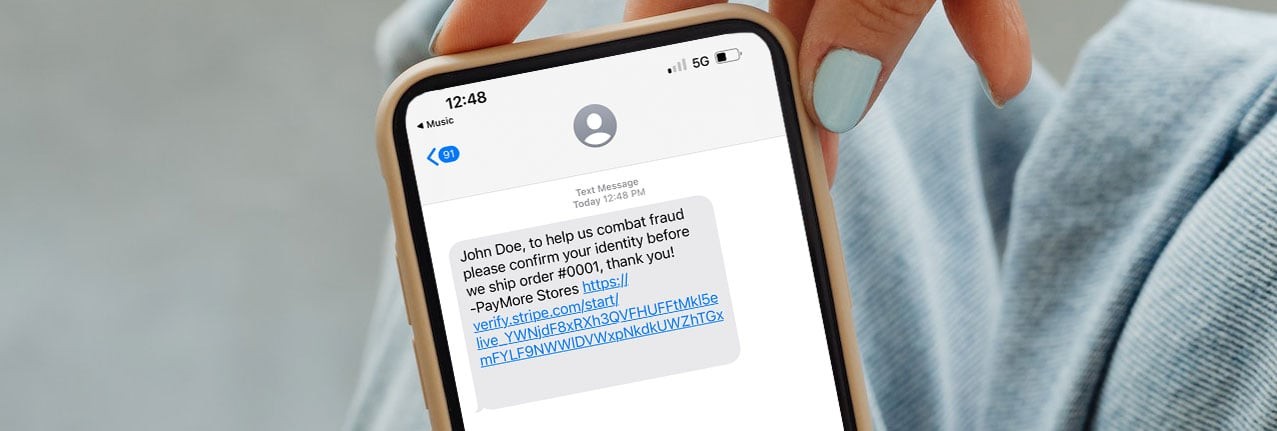

PayMore Stores ID Verification Check
Sometimes, when you purchase a device at a PayMore Store, you may receive a text message or email asking you to verify your identity. This is sent when an order is over a certain dollar amount, or our internal fraud program flags your transaction. We’ve partnered with Stripe Identity to faciliate the verification process.
Why am I being asked to verify my identity?
If you’ve received a text message or email from us asking you to verify your identity, here are possible reasons why:
- You are a first time customer with our company.
- You have ordered something over a certain dollar amount.
- Your transaction was flagged by our internal fraud department as suspicious.
Stripe Resources and Common Questions
- Best practices for successful verifications
- How can I delete my submitted identity data?
- How are you keeping my verification data safe?
- Who has access to the verification data captured?
- What information are you collecting?
- What is Stripe doing with my data and is Stripe acting as a data processor or controller?
- What is Stripe's retention period for biometrics?
- Does Stripe comply with Japan's Act on Prevention of Transfer of Criminal Proceeds?
Frequently Asked Questions
Your order was flagged by our system for additional review due to unusual activity or high-risk indicators. To protect your information and prevent fraud, we ask you to verify your identity through Stripe, a secure and trusted platform.
Yes, Stripe Identity is a secure and widely trusted tool used by many online businesses. Your information is encrypted, securely processed, and never shared without your permission.
You’ll need a valid government-issued photo ID, such as a driver's license or passport. Stripe will guide you through the process using your device’s camera. You may be asked to take a selfie to validate your ID.
The verification process usually takes just a few minutes. Once completed, your order will be reviewed and processed as soon as possible.
If you choose not to complete the ID check, we won’t be able to fulfill your order, and it may be canceled and refunded as a precaution against potential fraud.